Icon of program: MenuCalendarClock iCal

MenuCalendarClock iCal for Mac

  • Free
  • 3.9
    10
  • 6.1K
  • V4.5.2
Free Download for Mac

View an ad to download for free

Access iCal from your Menu Bar

iCal is great but it would be even better if you could access it from your Menu Bar as well.

Top Recommended Alternative
MenuCalendarClock iCal

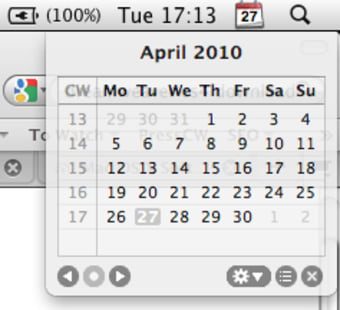
gives you instant access to your iCal calendars from a menu bar icon placed in the top right corner of your screen.

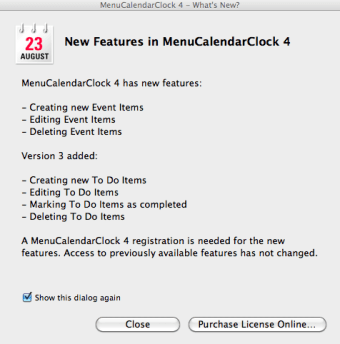
In just a click, you can reveal a monthly calendar view of all your iCal entries. Note that although most features are free to use, some advanced features require registration.

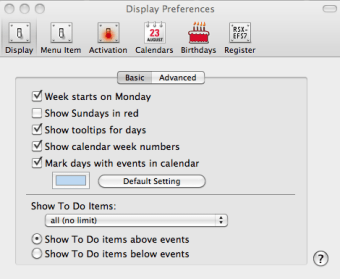
When you double click on a date in MenuCalendarClock iCal, it automatically launches iCal for editing. Clicking on the system cog in the Menu Bar or CMD-clicking on the Dock icon (which is a bit unnecessary considering this is just a plugin) reveals the preferences available.

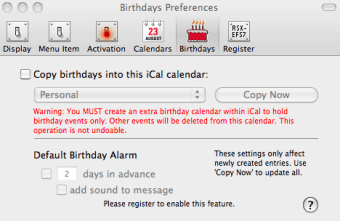
There are an impressive array of customizations possible including the possibility to enter birthdays, filter which iCal calendars you want it to integrate with and configure Hotkeys to activate it.

Urgent Note: Updating from 4.1.0 might fail due to problems with the update framework. In that case, please download and install "manually" by dragging MCC into the Applications folder. 64-bit support on Snow Leopard (Mac OS X 10.6.x) systems Updated danish translation thanks to S. Nielsen Usability: New events/tasks now have their inspector title preselected to immediately start typing Usability: Double clicking en event/task also activates the title field in the inspector Improved: List display of selected events/to dos Fixed: Beeping in case of more than one alarm


  • Pros

    • Access iCal from your Menu Bar
    • Discreet and easy to access
    • Lots of preferences
  • Cons

    • Takes up dockspace despite being a plugin
 0/4

App specs

  • Developer

  • License

    Free

  • Version

    4.5.2
  • Latest update

  • Platform

    Mac

  • OS

    Mac OS X

  • Language

    English

    Available languages

    • German
    • English
    • Spanish
    • Finnish
    • French
    • Italian
    • Dutch
    • Norwegian
    • Russian
    • Chinese
  • Downloads

    6.1K

  • Size

    1.36 MB

Program available in other languages


Icon of program: MenuCalendarClock iCal

MenuCalendarClock iCal for Mac

  • Free
  • 3.9
    10
  • 6.1K
  • V4.5.2
Free Download for Mac

View an ad to download for free


User reviews about MenuCalendarClock iCal

3.9

2 reviews

Add review

Main reviews for you

  • Anonymous user

    I used this app for years. It's no longer really compatible (compatibility stopped at 10.7), and I found a better alternative, so I tried to delete it. I deleted the app file. I deleted the preferences, everything I could find. The app is still running. Its incompatibility with the modern macOS means it no longer displays a settings gear icon, so there's no way to quit it within itself. It can't be dragged off the menu bar. It's still running on multiple Macs, after many, many reboots. Absolutely maddening. I paid for Bartender just to hide it.

  • Anonymous user

    Bug Safari/MCC. When in Safari and you want a defenition on a word and you hold ctrl, cmd and d down it opens Menu Calendar Clock instead. Clicking on Safari again then the defenition comes up. Pros: Just Great product.

More

You may also like

Alternatives to MenuCalendarClock iCal

Explore Apps

Latest articles

Laws concerning the use of this software vary from country to country. We do not encourage or condone the use of this program if it is in violation of these laws.
Softonic

Is MenuCalendarClock iCal safe?

100/100

Score result: Clean

This file passed a comprehensive security scan using VirusTotal technology. It is safe to download.

  • Virus free
  • Spyware free
  • Malware free
  • Verified by Security Partners

    VirusTotal logo

Scan Info

Last scan
Thursday, February 27, 2025
Scan provider
VirusTotal · Full report

File Integrity

File
MenuCalendarClock_iCal_V4.5.2.gz
SHA256
7c78428fd22d0a3fa02e5df4c92fbb45dad881a7ba09205dc47c4bfaaf7f7f9e
SHA1
58d35d6c1024ab77c974bd42d71fdb7081dcd167

Softonic security commitment

MenuCalendarClock iCal has been thoroughly scanned by our advanced security systems and verified by industry-leading partners. This file comes from the official developer and has passed all our security checks, showing no signs of viruses, malware, or spyware. For more information, visit our Security and Trust Center

Signed in to Softonic as